 DramaRemix
Watch a story.
Make it your own.
Interactive short dramas · AI-assisted story creation
Project overview
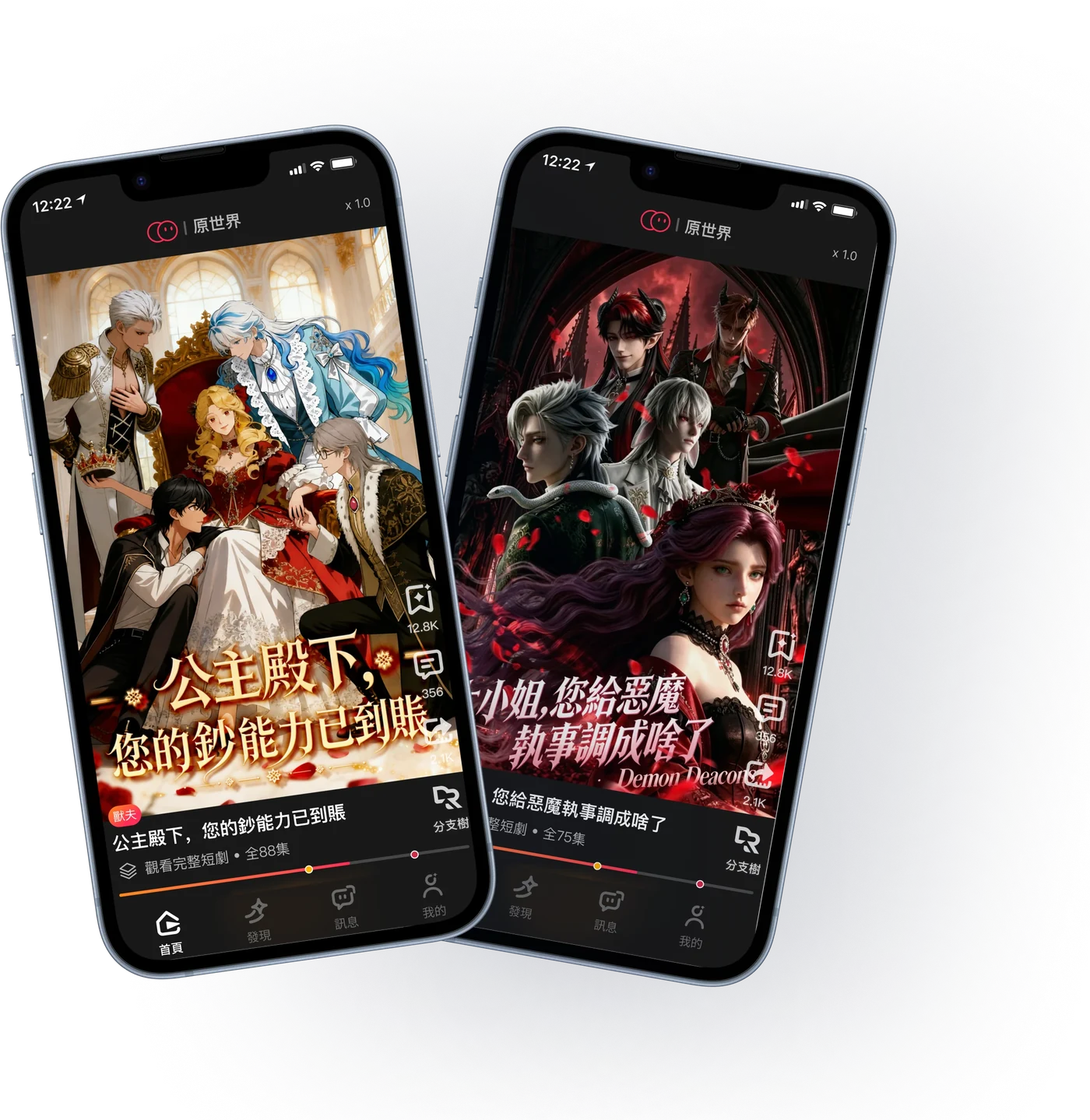
DramaRemix is an interactive short-drama app where viewers can watch stories, explore different plot branches, and use AI to create their own storylines with familiar characters.
Team & my role
- Designer · me
- 1
- Product manager
- 1
- Engineers
- 3
As the team’s UI / UX Design Intern, I worked with a product manager and three engineers across two stages:
Building the UI foundation. I translated product requirements into page layouts, reusable components, and interface states, establishing a consistent foundation across the app.
Refining key experiences. I independently reviewed the creation flow and Personal Center, then used usability findings to redesign creation steps, clarify generation feedback, and improve how users find and manage their work.
- Design review
- User research · interviews
- UI foundation · v1
- Creation Center
- Personal Center
- Topics & collections
Bars start on the real dates; short ones are widened to fit their label. After launch: the Personal Center iteration, and topics & collections v1 — designed during the internship.
- Before launch
- After launch
My contribution
0 → 1
Built the UI foundation
Turned product requirements into page layouts, reusable components, and interface states.
- 15
- Usability-test participants
- Sessions I moderated to investigate task barriers.
- 2
- Core experiences refined
- Creation flow and Personal Center, from review to redesign.
UI system: 7 specification boards · 44 icon assets & variants · 16 core color tokens · 6 text styles.
Design Review
Review the existing experience, test key tasks with users, and identify the issues that would guide the design work.
Review approach
Understand the experience.
Decide what needs attention first.
We reviewed the existing design together, then used user feedback to clarify the priorities.
- 01
Review the design. Walk through the key tasks and screens together.
- 02
Record observations. Note unclear interactions, states, and inconsistent patterns.
- 03
Validate with users. Turn the observations into questions for user testing.
- 04
Set priorities. Separate shared UI foundations from focused UX redesigns.
Review · Usability testing
Usability Test Results
I moderated usability testing with 15 participants to assess how these issues affected key tasks: watching, choosing, and creating.
15participants, moderated by me
12issues from review and testing
3insights that set the priorities
Moderated usability testing · late June – July 2026 · tasks drawn from the design review
Major · Blocks task completion
Finding 03 · Creation Center
Users do not know how to continue creating.
- 01
An unclear sequence
Story context, creative choices, and generation controls compete for attention.
- 02
Uncertain system state
Generation stages, credit use, and the effect of refreshing need clearer explanations.
Task impact — Not knowing what to do next can stop the creation task entirely.
Key Findings
How the findings shaped the design
Finding 01
Unclear next step
Tags, story context, and controls competed for attention.
Design direction
One step at a timeFinding 02
Unclear AI feedback
Generation progress, credit use, and refresh behavior were unclear.
Design direction
Clear generation statusFinding 03
Inconsistent UI patterns
Tags, view counts, and buttons lacked shared rules.
Design direction
A shared UI system
Phase 01
Design System & UI Foundation
The visual inconsistencies appeared across multiple screens. I started with a shared foundation so the UI could follow consistent rules before refining individual experiences.
Phase 1 · Foundation
Design System
I built reusable components, text styles, colors, and states, then applied this shared foundation across the app’s interfaces.
From tokens to components
- Core color tokens
- 16
- Specification boards
- 7
- Icon assets & variants
- 44
- Text styles
- 6
Color
Core tokens · selected from 63 paint definitions in the source files
Brand
Brand gradient
#FF891B → #FE2C55
Brand icon / unread
#FE2C55
Warning / brand orange
#FF891B
Free viewing
#FFB000
Surface
Base surface
#181818
Dark card
#252525
Divider
#FFFFFF / 5%
Subtle border
#FFFFFF / 12%
Text
Primary text / icons
#FFFFFF
Secondary white
#FFFFFF / 80%
Supporting gray
#9C9C9C
Placeholder white
#FFFFFF / 50%
Feedback
Like
#FF1C41
Error
#FF3D3D
Modal overlay
#000000 / 50%
Skeleton
#5D5D5D → #282828
Typography
Font family
苹方
PingFang SC
Regular / Medium
Type scale
18med
18px · Medium
选择你的故事
Shape your story
16-medium-按钮
16px · Medium
选择你的故事
Shape your story
16-medium
16px · Medium
选择你的故事
Shape your story
16
16px · Regular
选择你的故事
Shape your story
14
14px · Regular
选择你的故事
Shape your story
12
12px · Regular
选择你的故事
Shape your story
Line height
Auto
Applied to all six source text styles.
Font weight
Iconography
24 × 24 px · 44 assets, including variants
 01
01 02
02 03
03 04
04 05
05 06
06 07
07 08
08 09
09 10
10 11
11 12
12 13
13 14
14 15
15 16
16 17
17 18
18 19
19 20
20 21
21 22
22 23
23 24
24 25
25 26
26 27
27 28
28 29
29 30
30 31
31 32
32 33
33 34
34 35
35 36
36 37
37 38
38 39
39 40
40 41
41 42
42 43
43 44
44Original icons and state variants, with source construction guides preserved.
Radius
Corner radius
Compiled from source radius notes and existing components.
4 px
Thumbnail / Badge
8 px
Input / Small cover
12 px
Content card
16 px
Modal card / Large image
Full radius · Buttons & credits
Buttons: 999 / 9999 · Credits: 999
Pill shape · Rendered radius is limited by component height.
Circle · Avatar
50%
Source notes
The radius scale and avatar usage follow the source notes. Button and creation-card values were verified against components. One character image still uses 10 px; historical screens are not fully standardized.
Button
Type & state
Small · 32 px
Primary
Secondary
Disabled
Small · 36 px
Primary
Secondary
Disabled
Medium · 48 px
Primary
Secondary
Disabled
Large · 52 px
Primary
Secondary
Disabled
English-label specimens · Source heights and state treatments.
Full-width source button: 350 × 48 px
Navigation
Selected states
430 × 49 px · 4 destinations
English-label schematic of the four source states.
Loading
Loading indicator
With label / Indicator only · 120 × 120 px
Skeleton · Content loading
Schematic using the source skeleton gradient.
Color · Typography · Iconography · Radius · Buttons · Navigation · Loading
Phase 1 · Screens
UI Design
The starting point was a working prototype. I applied a shared visual foundation across playback, story choices, discovery, creation, generation states, and the Personal Center. The composition below pairs those original screens with one branded Playback interface.
From prototype to a shared visual language
One foundation. A consistent identity.
I inherited a working prototype, then established a shared visual foundation across its interfaces.
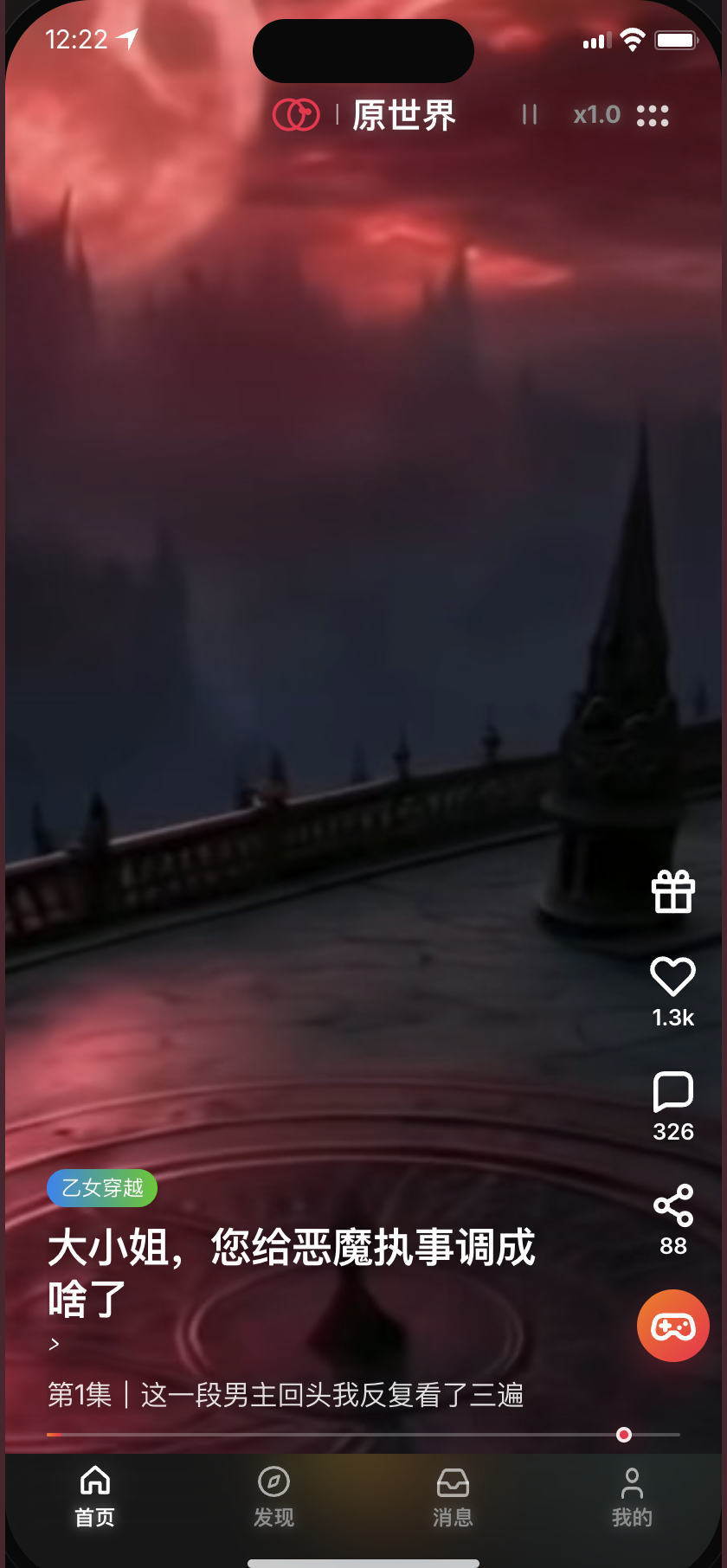
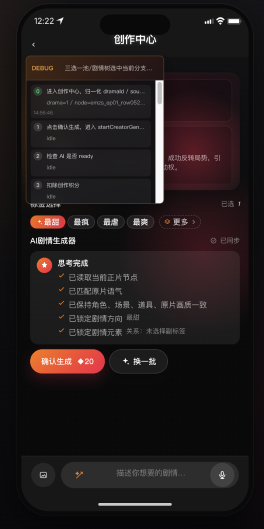
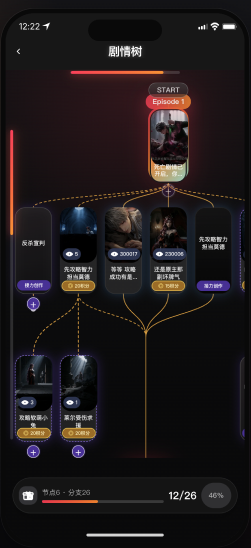
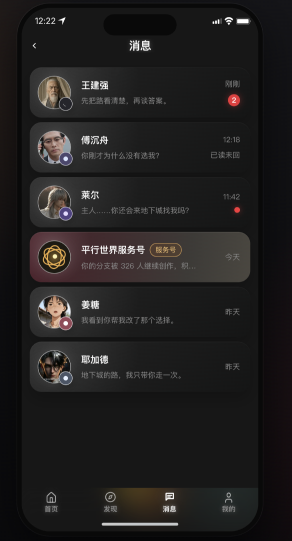
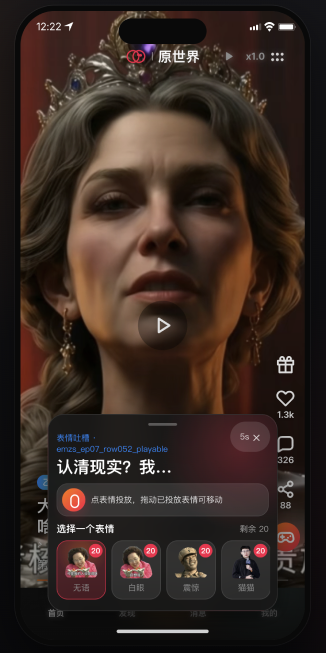
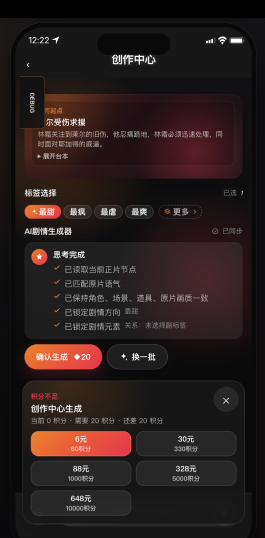

Phase 1 · What I delivered
Page layouts, reusable components, and interface states—a UI foundation for the product’s first complete experience.
Phase 02
After Launch · UX Redesign
After launch, I returned to the UX issues identified in the review and testing. I focused on two experiences: helping users move through creation and helping them find and manage their work in the Personal Center.
Phase 2 · Iteration 01
Creation Flow Iteration
01 / Before & after
From competing inputs to a guided flow.
Before
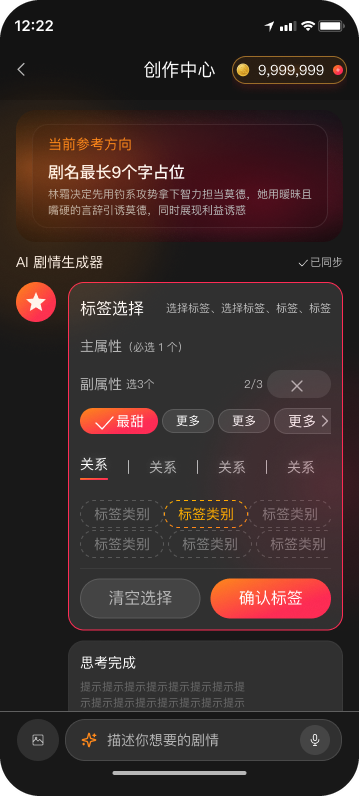
- Competing information
- Unclear sequence
- Unclear next action
After
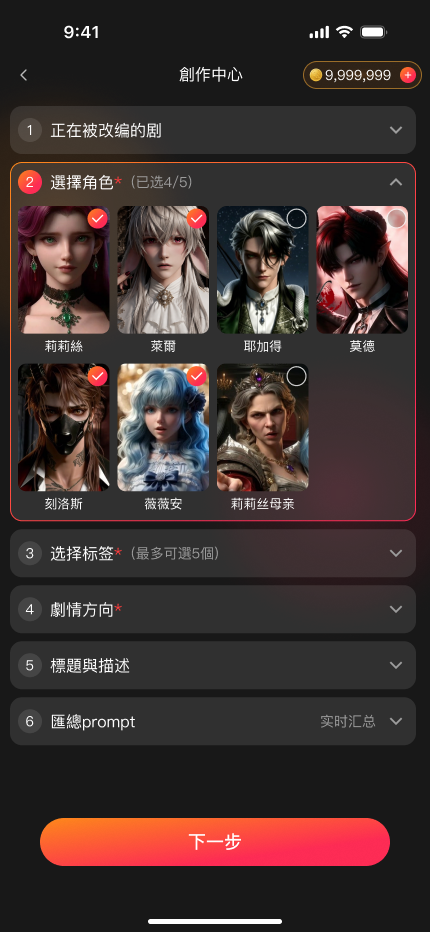
- Focused choices
- Step-by-step guidance
- Clear next action
02 / The redesigned flow
Create in three guided steps.
Choose your cast, shape the story, then review and generate.
Step 01
Choose the characters
A clear starting point. Choose familiar characters from the original story. Keeping one section open helps users focus on the current choice.
Step 02
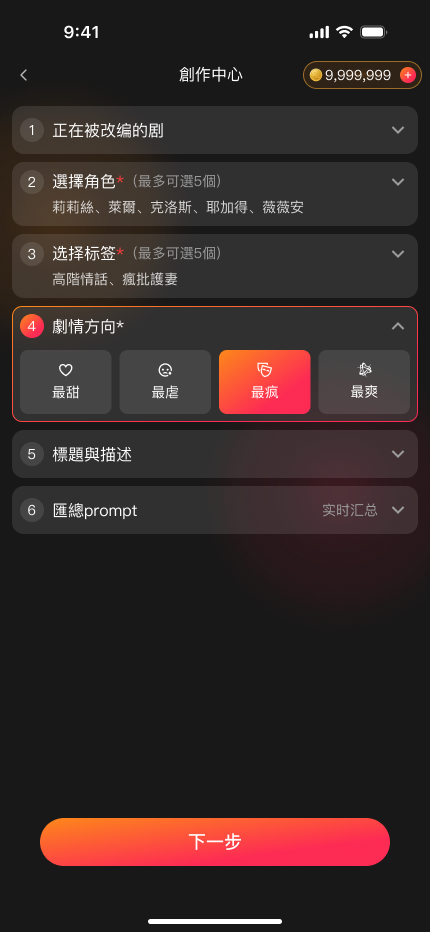
Shape the story
One creative decision at a time. Choose a story direction in its own section, while earlier choices remain visible as compact summaries.
Step 03
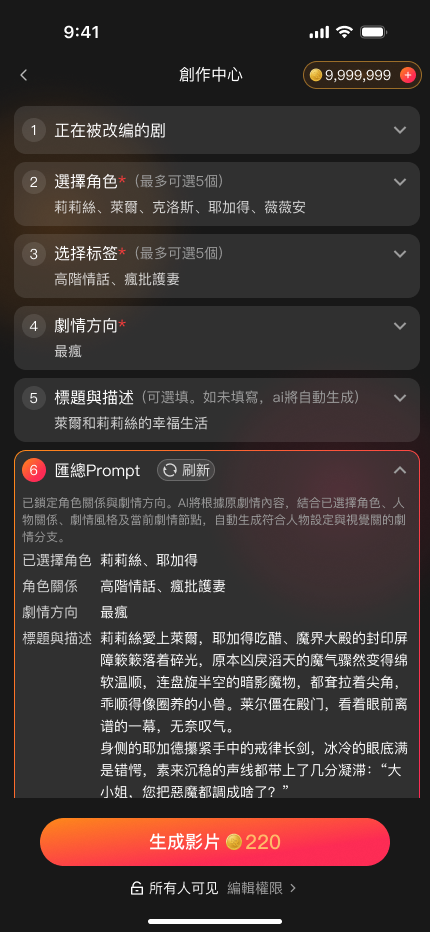
Review before creating
Confirm before committing. Review the assembled prompt and see the credit cost before generating the story.
03 / Walkthrough
Interactive Prototype
- 01
Confirm the brief
Prompt and credit cost shown before Create turns on
- 02
See the status
Progress while the AI works
- 03
Recover from failure
The reason first, then a retry
Phase 2 · Iteration 02
Personal Center Iteration
From viewing history to creations and performance.
Before
After
DESIGN RATIONALE
Navigation Hierarchy
Creation first
Default to Creation for checking video performance and status.
Favorites before History
Prioritize saved stories, which viewers revisit more often than their history.
DESIGN RATIONALE
Creator Performance
Track overall performance and the metrics that matter for each video.
Across all creations
Review performance across all your creations.
For each video
See views, earnings, likes, and comments for each video.
03 · Showcase
Final Design
Watch a story, shape a new direction, and return to your creations. A selection of the final interfaces across the product.
01 / Watch & choose
One story.
More possibilities.
Watch, choose a branch, and explore how the story connects.
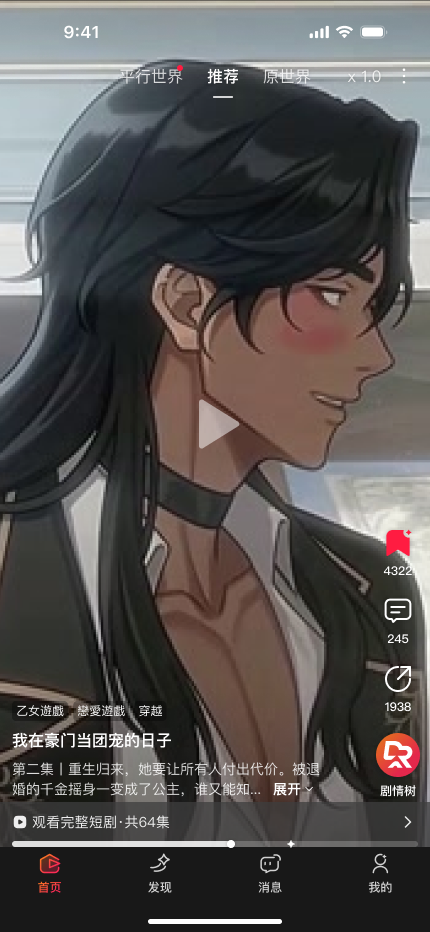
Watch
Watch a story, then explore another direction.
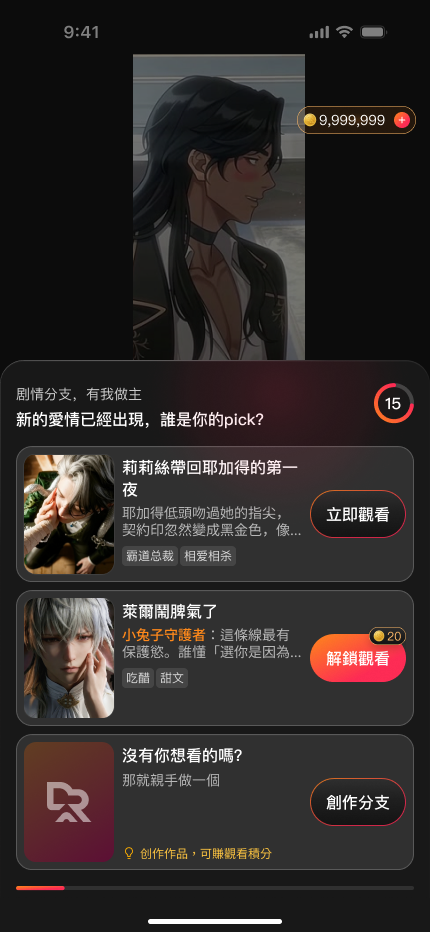
Choose
Explore the available branches at a story moment.
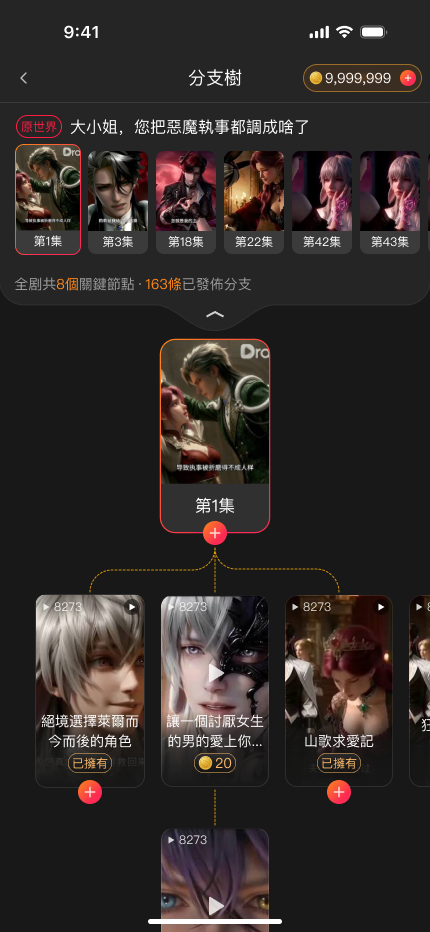
Explore
See how the story branches connect.
02 / Create
Give your idea
a direction.
Characters, story direction, and a final prompt review.
Cast
Start with characters from the original story.
Direct
Choose where the story goes next.
Review
Review the prompt before generating a video.
03 / Return & discover
Your stories.
And what comes next.
Return to your work or find something new to watch.
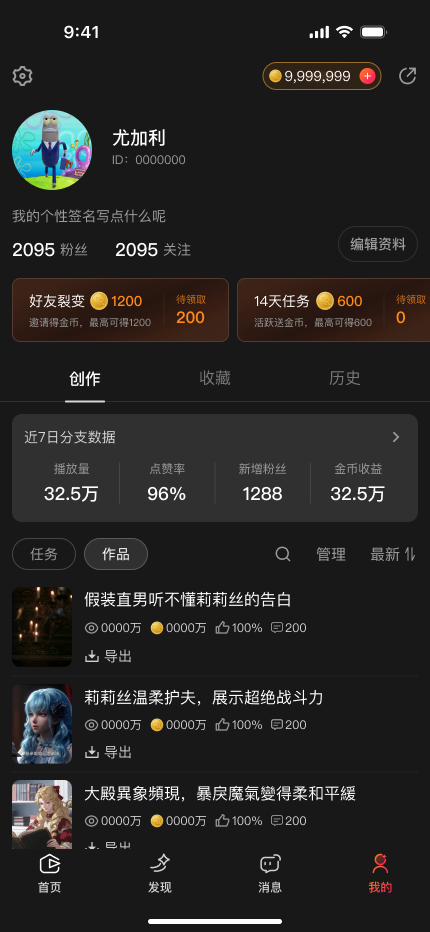
Your work
Find creations and their performance in one place.
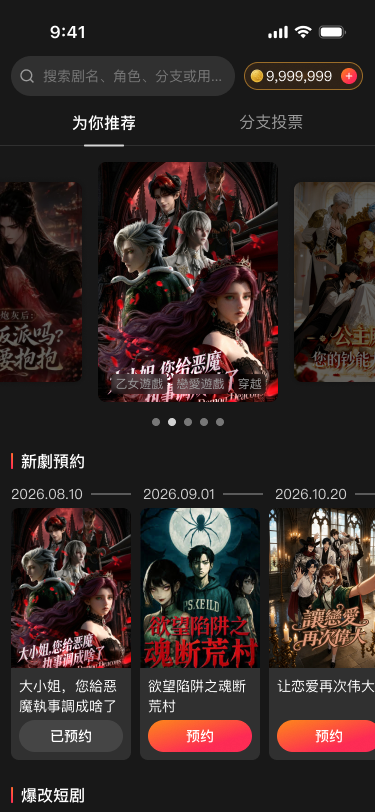
Discover
Browse stories and continue watching.
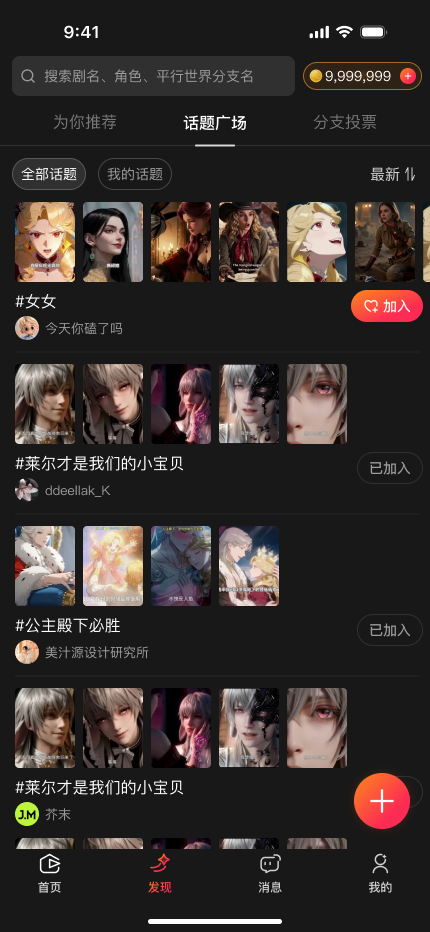
Topics
Explore stories around shared interests.
Selected final product interfaces. The story tree provides product context, outside the iteration work discussed above.
04 · Reflection
Reflection
01
Design for the whole experience
I learned to consider how watching, creating, and returning to previous work connect, and to evaluate individual design decisions within that broader journey.
02
Prioritize information around user goals
I learned to prioritize information by its relevance to the user’s current task—from making story choices to checking video performance—and keep secondary details available without competing for attention.
03
Validate the next iteration
Next, I would test where users hesitate and whether the revised creation flow reduces effort without limiting control.